Stop Drawing Architecture Diagrams Manually: Meet the Open Source AI Architecture Review Sample
Microsoft Tech Community | February 21, 2026
Motive / Why I Wrote This
Architecture review is supposed to improve the quality of systems. Too often, however, teams spend most of their time preparing for the review instead of actually having the review. They gather scattered context, redraw diagrams, reconstruct service dependencies from memory, and manually translate informal notes into something presentable enough for discussion.
I wrote this article because I wanted to document a different approach-one that respects how engineers actually work. Instead of requiring a perfect architecture specification up front, the Architecture Review Agent accepts the kinds of inputs teams already have, transforms them into a structured first-pass review, and returns artifacts that are useful immediately in meetings, docs, follow-up tasks, and decision-making.
The real motivation was not to automate architecture judgment away. It was to reduce the repetitive friction around preparation so human reviewers can spend more time on the parts that actually matter.
Problem Context: Why Existing Workflows Break
Across real projects, architecture intent almost never lives in one clean source. It is usually spread across:
- partial YAML or deployment specs,
- markdown design notes,
- code comments and README files,
- issue or pull request discussions,
- outdated diagrams,
- and plain-English explanations written for humans rather than machines.
That fragmentation creates a practical problem. Before teams can even discuss reliability, scalability, security, cost, or resiliency, they first have to reconstruct the system. That reconstruction step is slow, inconsistent, and highly dependent on whoever happens to know the system best.
This is exactly where review quality starts to slip. Important architectural risks go unnoticed, diagrams lag behind implementation, and the quality of the review becomes dependent on manual effort rather than the quality of the engineering discussion itself.
The underlying problem is not lack of technical knowledge. It is lack of a fast, repeatable way to convert messy architecture context into something structured enough to review.
What I Built
The Architecture Review Agent is a full architecture-analysis pipeline that moves from raw architecture input to a review-ready output package.
In practical terms, it does five things:
- accepts architecture descriptions in both structured and unstructured forms,
- parses or infers components, responsibilities, and relationships,
- evaluates the resulting architecture for severity-grouped risks,
- generates an interactive visual diagram and a presentation-friendly image,
- and exports a structured review bundle that can be reused outside the tool.
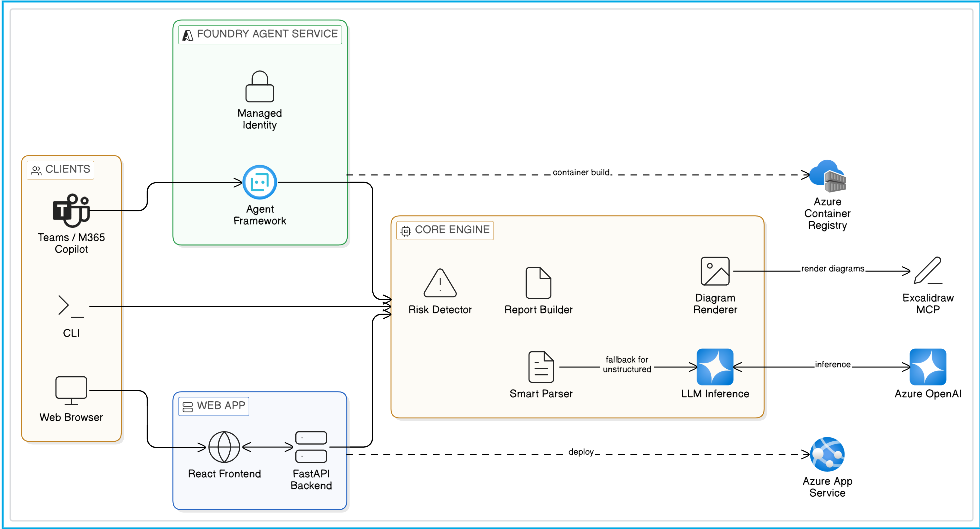
I intentionally supported three execution surfaces because the same review logic needs to fit different workflows:
- CLI mode for quick local iteration and scenario testing,
- Web App mode using FastAPI + React for a browser-based collaborative review experience,
- Hosted Agent mode on Microsoft Foundry for managed deployment, API-style access, and agent-native operating models.
The important architectural choice here is that these are not separate systems. They all sit on top of the same core review engine, which keeps the output consistent regardless of where the review is triggered.
What you actually get back
One of the reasons this sample resonates with teams is that the output is not vague. When the pipeline completes, it returns artifacts that are immediately useful in an engineering workflow:
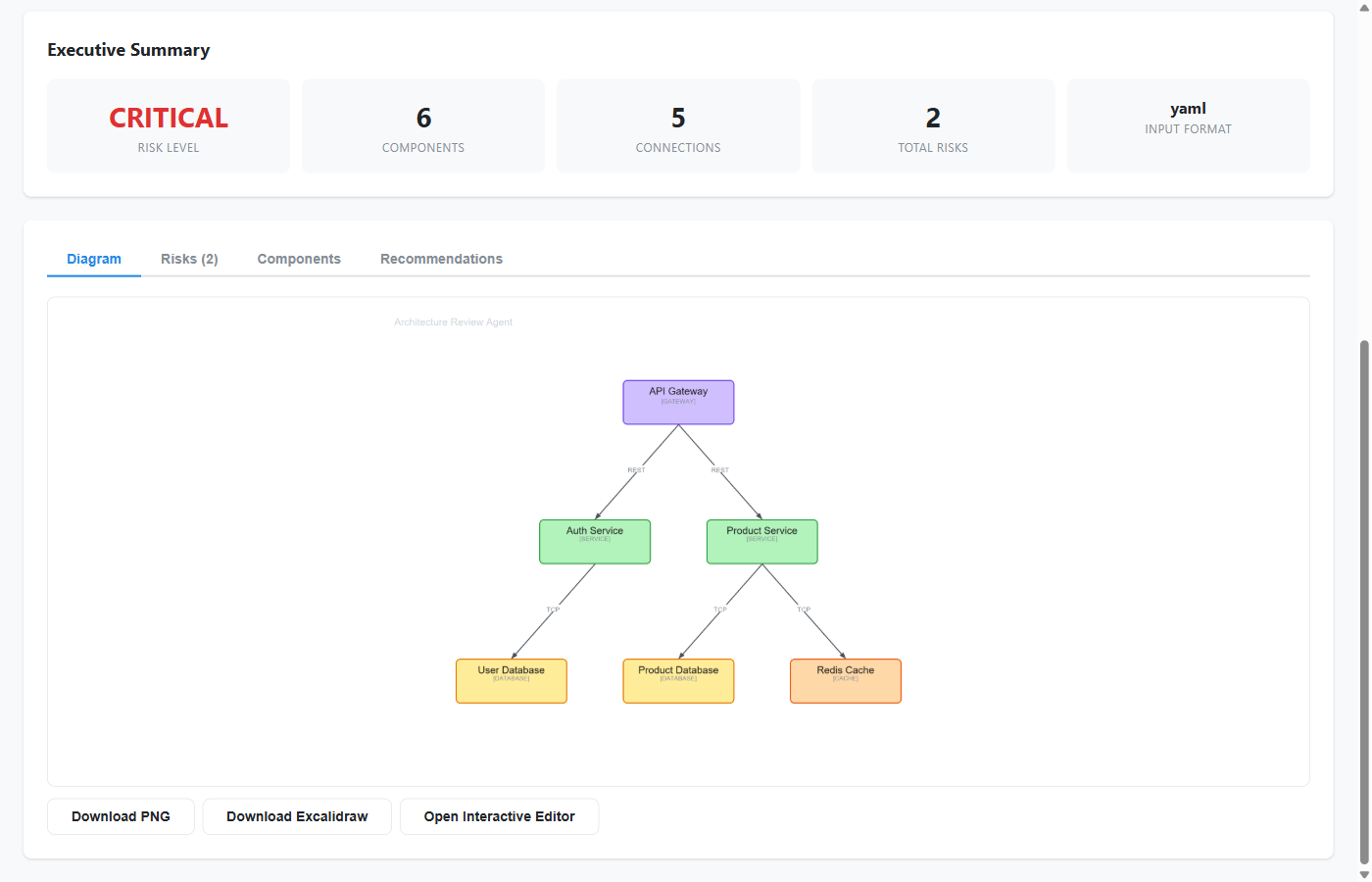
- an interactive Excalidraw diagram that can be edited instead of recreated,
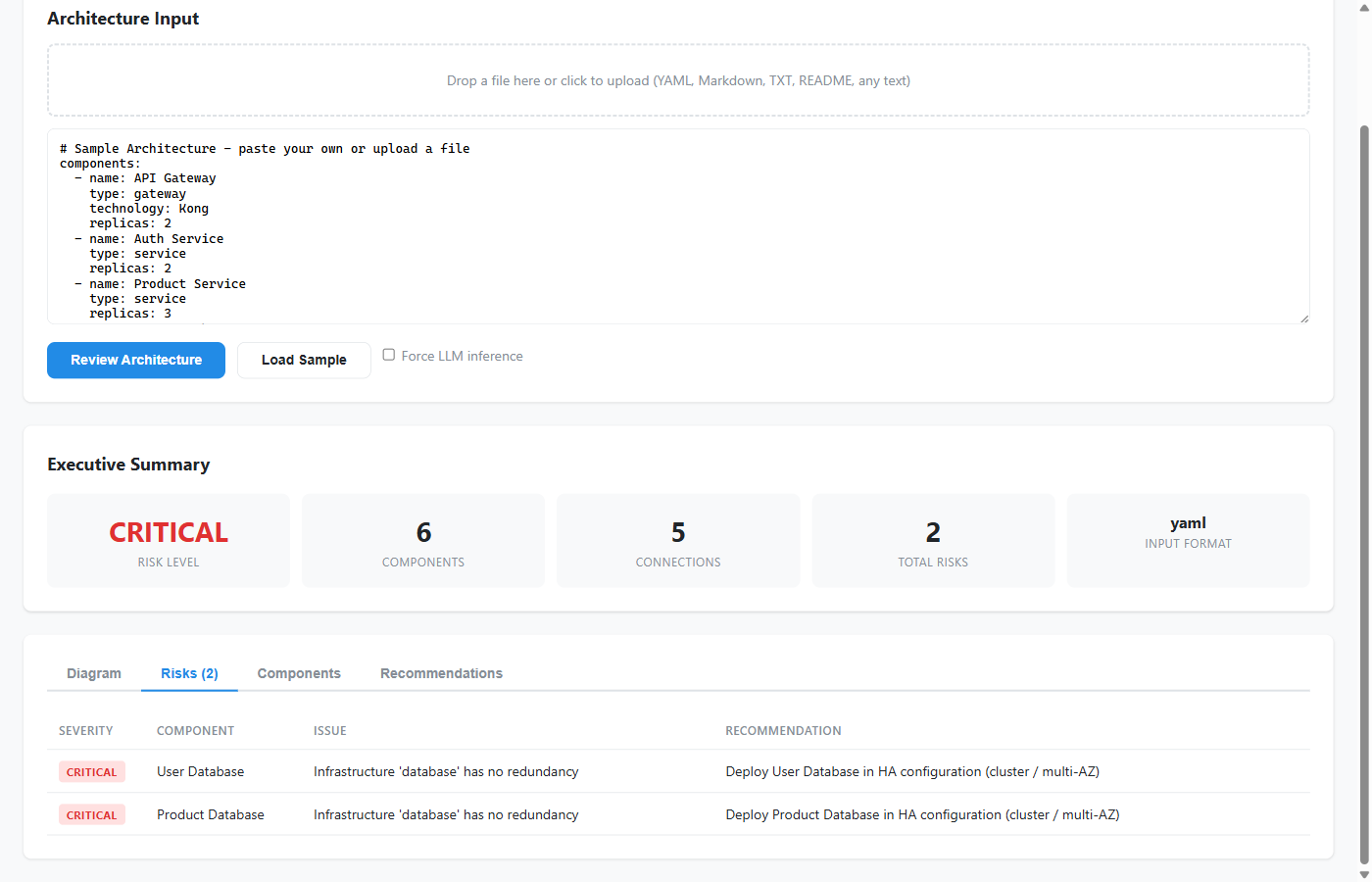
- a prioritized risk assessment that groups issues by severity,
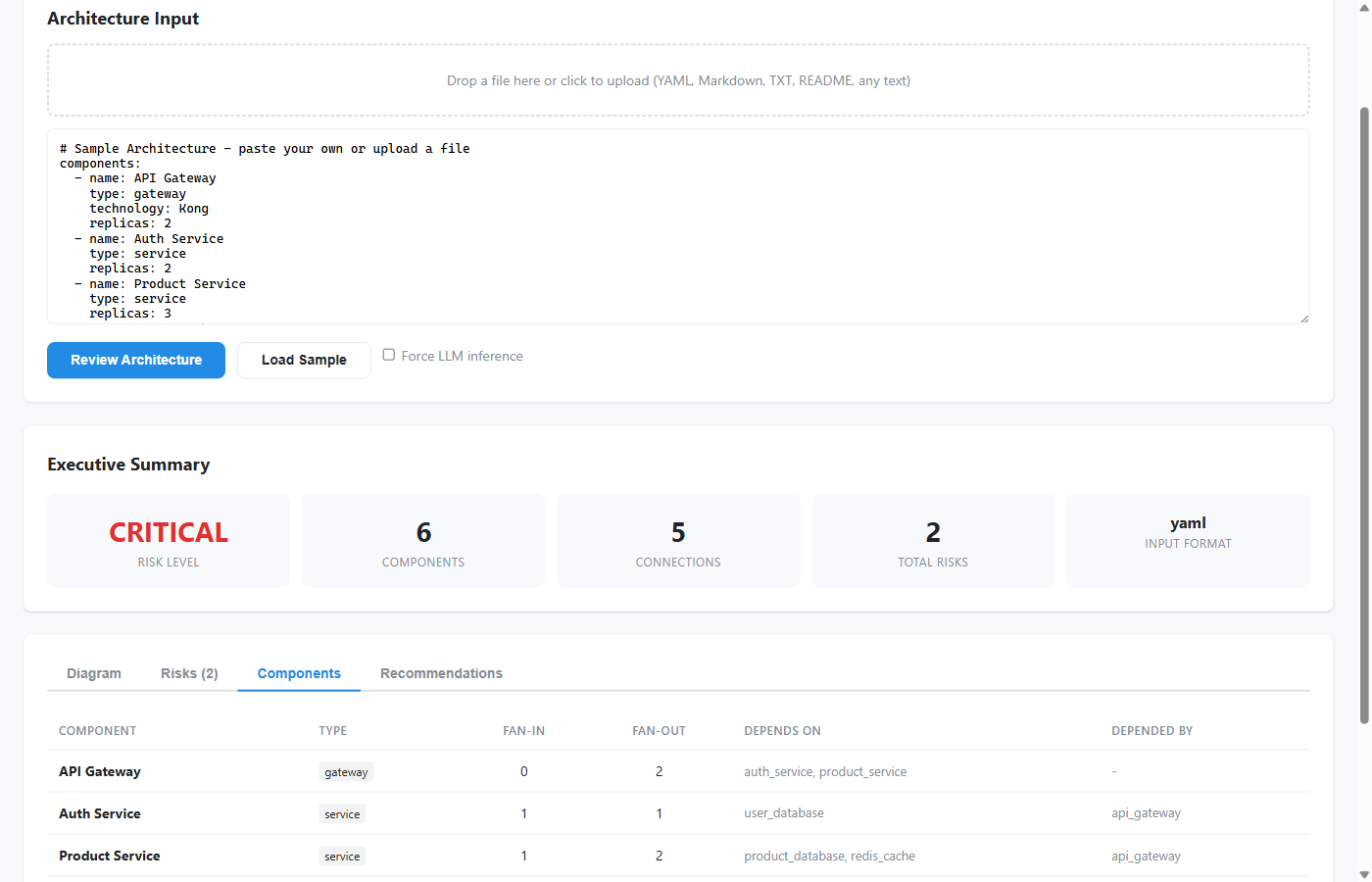
- a component dependency view that makes coupling and concentration easier to spot,
- and a structured review bundle that can be saved, shared, or integrated into later tooling.
That combination is what makes the sample feel practical. It does not stop at “I detected some components.” It produces a review package that can be discussed, challenged, and reused.
The End-to-End Process, Properly Explained
One of the reasons I wanted this project documented well is that the workflow itself is more interesting than a one-sentence summary suggests. The sample is not “just a diagram generator.” It is a sequence of engineering-oriented transformations.
1. Input comes in the way real teams already describe systems
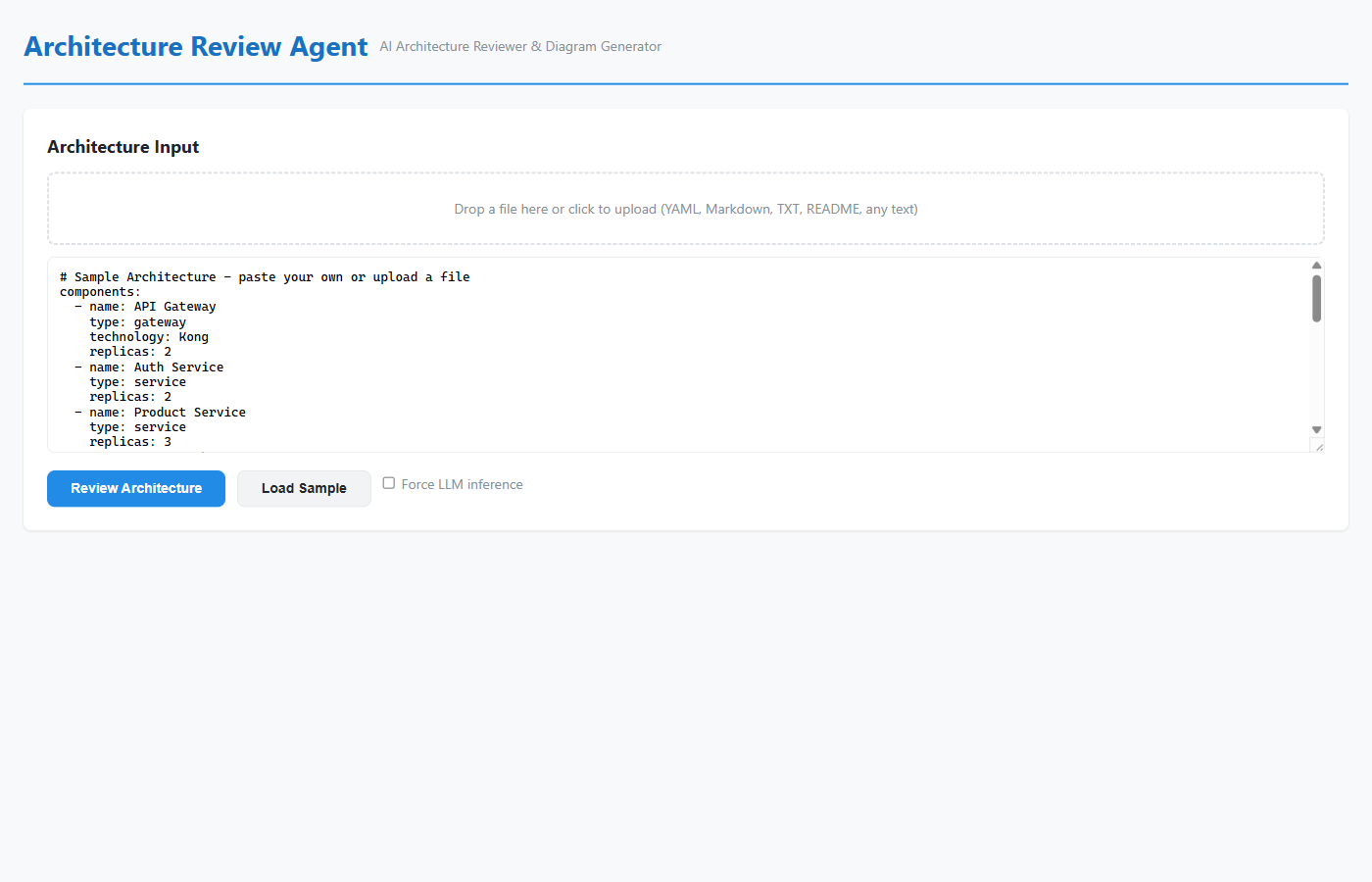
The first step is deliberately flexible. The sample can work with YAML, markdown, plaintext arrow chains, README content, design notes, and general prose. That flexibility matters because architecture rarely starts in a pristine schema. The tool is meant to meet teams where they are, not force them to rewrite their design before they can review it.
2. The pipeline uses deterministic parsing first
When the input is structured enough, the system uses a rule-based parser to recover components and connections quickly. This path is fast, transparent, and easier to validate. It works particularly well for YAML and markdown inputs that already hint at services, nodes, dependencies, or flows.
3. LLM inference fills the gap when the input is messy
If the structured parser cannot recover enough useful architecture, the pipeline falls back to LLM inference. That means the system can still work when the source material is a loose design note, a README, or an informal system description such as “React frontend, Kong gateway, three services, and PostgreSQL.”
This fallback is a big part of why the project is useful in real engineering environments. The architecture is often there, just not in a machine-friendly format yet.
4. Everything is normalized into one internal architecture model
Whether the architecture is parsed directly or inferred by the model, the result is normalized into a component-and-connection graph. That internal representation becomes the source of truth for everything else in the pipeline: risk analysis, visual layout, dependency mapping, and recommendations.
Without this normalization step, every downstream feature would become brittle. With it, the rest of the system can reason consistently about the architecture regardless of how the input originally looked.
5. The risk engine turns architecture structure into review findings
Once the system has a usable architecture model, it analyzes it for real engineering concerns: single points of failure, weak redundancy, scalability bottlenecks, risky coupling, poor boundaries, and other architectural anti-patterns. The findings are grouped by severity so the result feels like a review output, not a raw dump of observations.
This was a major design priority for me. The output needed to change engineering conversations, not just decorate them.
6. The diagram is generated as something teams can keep using
The sample generates an interactive Excalidraw representation and also exports a PNG. That combination matters. Excalidraw keeps the result editable for future design discussions, while PNG makes it easy to paste into slide decks, reports, or wiki pages.
The system is intentionally designed so the visual is not the only output, but also not an afterthought.
7. The review is packaged as a reusable bundle
The final output includes the diagram files and a structured JSON review bundle. In practice, this means the review can be shared, downloaded, integrated into another tool, or used as input to later workflow steps. That packaging layer is what makes the sample feel operational rather than experimental.
The bigger point is that the pipeline compresses a lot of manual work into one repeatable flow. What used to take a mix of design interpretation, whiteboarding, spreadsheet-style review tracking, and late-night diagram clean-up can now begin with a single input and end with a review-ready package.
Why You Should Add It to Your Workflow
The article on Tech Community emphasizes that this project is not just interesting because it uses AI. It is useful because it reduces friction in parts of engineering work that are repetitive, error-prone, and easy to postpone.
1. Smart input intelligence
The first big advantage is that the sample works with what teams already have. If the input is structured, the rule-based parser handles it quickly. If the input is unstructured, the model can infer the architecture from code, prose, README files, design notes, or other free-form material.
That means teams do not have to pause and convert their architecture into a bespoke authoring format just to benefit from review automation.
2. Actionable, context-aware reviews
The second advantage is that the output is review-oriented, not just visually interesting. The system looks for design issues that matter in real systems: missing redundancy, shared database anti-patterns, poor boundaries, weak gateway patterns, scaling pressure, and related concerns.
It does not replace a formal review board or a security audit, but it does give teams a much faster way to surface the issues worth discussing first.
3. Exports that actually matter
The third advantage is that the generated artifacts stay useful after the initial run. Teams can use the PNG for documentation and presentations, while the .excalidraw output remains editable for follow-up design work. That combination is much more valuable than a static image that becomes stale the moment the discussion continues.
A quick note on AI recommendations
This is an important nuance from the published article: the Architecture Review Agent is meant to be a co-pilot, not a final authority. The risk findings and recommendations are there to accelerate review and focus attention, not to replace human expertise. Teams should still validate the output, verify assumptions, and run formal security or compliance reviews where needed.
Evolution: StructureIQ → Official Azure Sample
This did not begin as an official sample.
It evolved from my original project:
Then expanded into:
The evolution required more than a rename. It involved:
- moving from one usage path to CLI + Web + Hosted Agent experiences,
- improving outputs from “diagram generation” to review-oriented analysis + recommendations,
- producing clearer setup, deployment, and operational guidance,
- and aligning the repository with expectations for official sample consumption.
That shift matters because it changed the kind of problem the project was solving. StructureIQ showed that architecture understanding and diagram generation could be automated. The Azure Samples version demonstrates how that idea can be delivered as something teams can actually evaluate, run locally, expose through APIs, and deploy into modern Azure/Foundry workflows.
Why This Matters in Real Teams
Architecture communication usually breaks at handoff points. Platform teams think in terms of reliability and governance. Application teams think in terms of delivery speed and implementation detail. Review stakeholders want clarity, prioritization, and justification. If the architecture artifacts are incomplete or outdated, those groups end up arguing over reconstruction instead of discussing decisions.
This sample helps by making the output immediately actionable:
- severity-grouped risks that help prioritize discussion,
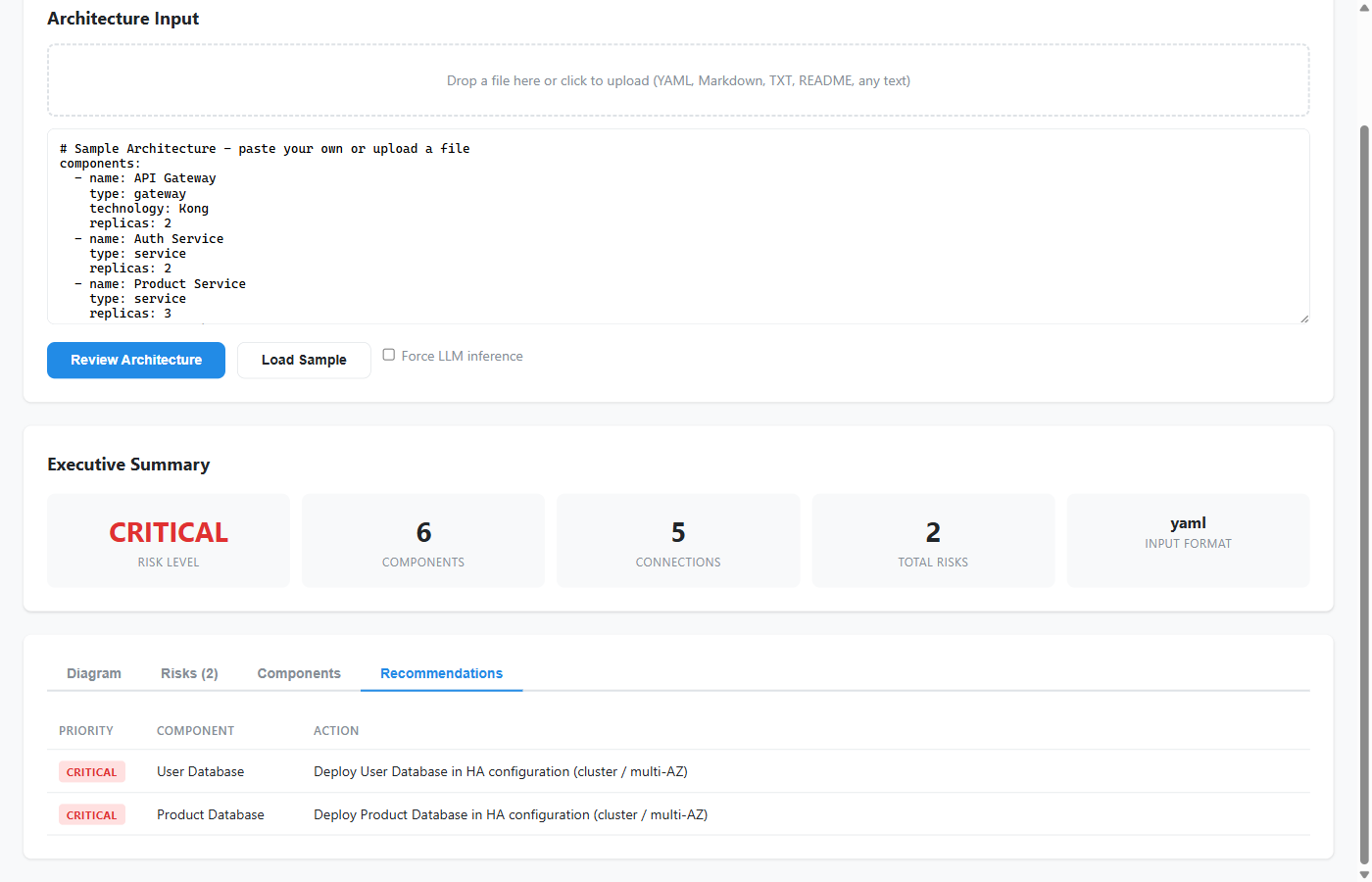
- structured recommendations that feel closer to engineering next steps,
- component mapping that exposes relationships and coupling,
- and editable diagrams that teams can refine instead of recreating from scratch.
That combination lowers the cost of review preparation while increasing the likelihood that teams notice the right issues earlier.
What Readers and Builders Get (Practically)
Readers and builders get more than an abstract concept. The sample includes:
- a realistic scenario walkthrough with expected outputs,
- concrete local run paths for CLI and browser-based review,
- hosted agent deployment guidance for Foundry,
- and a reusable review approach that can adapt to multiple architecture styles instead of one fixed template.
For developers, this makes the project a useful reference implementation. For engineering teams, it makes the project something they can try without first inventing the workflow themselves.
It is also useful for a less obvious audience: builders exploring how a code-first agent can move from local experimentation into a hosted, managed deployment model without rewriting the whole application. That is one of the reasons the sample works well both as a product demo and as an architecture for learning.
Scenario Walkthrough Used in the Sample
Primary scenario:
This scenario was chosen because it combines complexity and realism:
- multiple services,
- event-driven flows,
- critical data stores,
- compliance-sensitive transaction paths.
It is useful because it resembles the kind of system that actually benefits from review assistance. There are enough moving parts to test parsing quality, enough dependencies to make component mapping meaningful, and enough operational sensitivity to make the risk analysis feel grounded.
In the sample flow, the user provides the architecture, the system extracts or infers the relationships, runs the review pipeline, renders the diagram, and packages the results for download. That gives new users a very concrete sense of what “good output” looks like before they adapt the sample to their own systems.
The common output bundle includes:
architecture.excalidrawarchitecture.pngreview_bundle.json
Screenshots & Demo Artifacts
Architecture overview
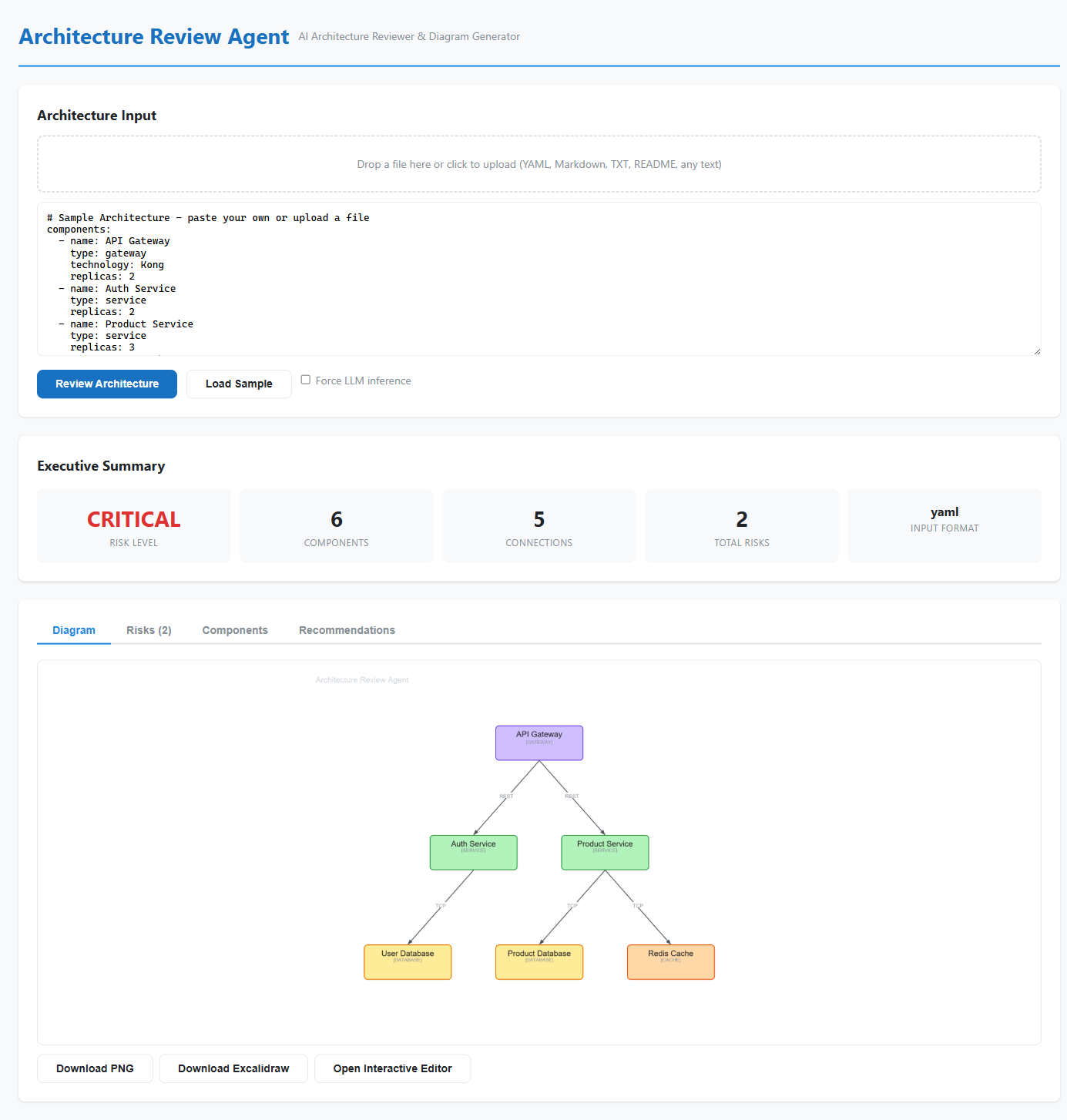
Product UI screenshots
Demo video
These media assets are included to make evaluation easier for new users before they commit to setup or deployment.
Deployment Story (Why Two Paths)
I kept both deployment paths intentionally because organizations optimize for different constraints, and I did not want the sample to assume that every team wants the same operating model.
Core Engine → Multiple Surfaces
graph TB
    Engine["Core Review Engine<br/>(Parsing + Analysis + Generation)"]

    Engine -->|Local Iteration| CLI["CLI Mode<br/>Python Scripts"]
    Engine -->|Custom Experience| WEB["Web App<br/>FastAPI + React<br/>App Service"]
    Engine -->|Managed Platform| AGENT["Hosted Agent<br/>Foundry<br/>Managed Runtime"]

    style Engine fill:#fff9c4,stroke:#f57f17,stroke-width:3px
    style CLI fill:#e8f5e9,stroke:#2e7d32
    style WEB fill:#fff3e0,stroke:#e65100
    style AGENT fill:#f3e5f5,stroke:#6a1b9a,stroke-width:2px
Option A - Web App on Azure App Service
The App Service path is the better fit when teams want a custom review application. In this mode, FastAPI exposes endpoints such as /api/review, /api/review/upload, and /api/infer, while the React frontend provides drag-and-drop input, tabbed results, and interactive diagram viewing.
This path is ideal for teams that want to own the browser experience, control the REST API surface, or integrate architecture review into existing internal tools, portals, or pipelines.
Option B - Hosted Agent on Microsoft Foundry
The Foundry Hosted Agent path is the better fit when teams want the review capability delivered as a managed agentic service rather than as a custom web app. In this model, the sample uses the Agent Framework hosting adapter to run locally first, then gets packaged as a hosted agent for Microsoft Foundry.
Hosted Agent Workflow: From Local to Managed
graph LR
    A["Local Development<br/>Run & Validate"]
    B["Containerize<br/>Linux AMD64"]
    C["Deploy<br/>Foundry Workflow"]
    D["Test<br/>Playground/Endpoint"]
    E["Publish<br/>Teams/Copilot/Channels"]

    A -->|Debug locally| B
    B -->|Push to Foundry| C
    C -->|Validate| D
    D -->|Iterate| A
    D -->|Live| E

    style A fill:#e8f5e9,stroke:#2e7d32,stroke-width:2px
    style B fill:#fff3e0,stroke:#e65100
    style C fill:#f3e5f5,stroke:#6a1b9a
    style D fill:#e3f2fd,stroke:#1565c0
    style E fill:#fce4ec,stroke:#c2185b,stroke-width:2px
What makes this path compelling is the platform support around it. Foundry Hosted Agents provide a managed containerized runtime, Responses-compatible access, managed identity, scaling behavior, observability hooks, and the ability to publish the agent into channels such as Teams or Microsoft 365 Copilot. The VS Code Foundry extension also provides a more guided deployment path, which makes the hosted-agent story easier to understand and demo.
Why Hosted Agent for Architecture Review?
graph TD
    Hosted["Foundry Hosted Agent<br/>(for this sample)"]

    Hosted --> A["Managed Runtime<br/>No infrastructure to own"]
    Hosted --> B["Conversation Flow<br/>Multi-turn interactions"]
    Hosted --> C["Identity & Auth<br/>Built-in security"]
    Hosted --> D["Telemetry & Observability<br/>Usage tracking"]
    Hosted --> E["Publish Anywhere<br/>Teams, Copilot, channels"]

    style Hosted fill:#6a1b9a,color:#fff,stroke:#4527a0,stroke-width:3px
    style A fill:#f3e5f5
    style B fill:#f3e5f5
    style C fill:#f3e5f5
    style D fill:#f3e5f5
    style E fill:#f3e5f5
There is also an important product-level difference between the two paths:
Comparing the Paths
graph TB
    subgraph WEB["Web App Path"]
        W1["Custom Browser UI"]
        W2["REST API Control"]
        W3["Infrastructure Ownership"]
        W4["Best for: Custom teams<br/>& internal portals"]
    end

    subgraph AGENT["Hosted Agent Path"]
        A1["Managed Runtime"]
        A2["Conversation Persistence"]
        A3["Publishing to Teams/Copilot"]
        A4["Best for: Managed services<br/>& rapid distribution"]
    end

    style WEB fill:#fff3e0,stroke:#e65100,stroke-width:2px
    style AGENT fill:#f3e5f5,stroke:#6a1b9a,stroke-width:2px
    style W1 fill:#ffecb3
    style W2 fill:#ffecb3
    style W3 fill:#ffecb3
    style W4 fill:#ffe0b2
    style A1 fill:#e1bee7
    style A2 fill:#e1bee7
    style A3 fill:#e1bee7
style A4 fill:#f3e5f5- the Web App path is ideal when your team wants a custom browser experience, custom REST contracts, and direct control over infra and integrations;
- the Hosted Agent path is ideal when you want a managed, scalable, agent-native runtime with conversation persistence, identity, observability, and publishing support built in.
That distinction is worth spelling out because it helps teams choose the sample for the right reason, rather than assuming one deployment path is inherently “better” than the other.
Deployment guide:
Design Principles Behind the Sample
- Input realism over template purity: handle what teams actually provide.
- Actionability over novelty: prioritize outputs that change engineering decisions.
- Editable outputs by default: generated artifacts should be starting points, not dead ends.
- Deployment optionality: one core engine, multiple production paths.
These principles shaped almost every decision in the project. Whenever there was a choice between something that looked cleaner in theory and something that worked better in a real engineering workflow, I consistently chose the latter.
What Changed for Me as a Builder
One of the most interesting parts of this project was realizing that the hard problem was not only architecture parsing. It was designing the handoff between understanding, analysis, visualization, and delivery.
It was not enough to detect components. The results had to be explainable. It was not enough to generate a diagram. The diagram had to remain editable. It was not enough to expose local code. The project needed a credible path to hosted deployment.
That is why the sample now works better as both a product-style demo and an engineering reference.
It also changed how I think about AI tooling for developers. The most useful systems are not always the ones that generate the flashiest output. They are the ones that remove repeated manual translation work and leave teams with something they can immediately act on.
Get Started in 5 Minutes
One of the most appealing parts of the sample is that it is easy to try. If you have Python 3.11+ and access to Azure OpenAI or a Microsoft Foundry project, you can run the project locally, feed it a scenario or a messy architecture description, and see the full review flow for yourself.
The simplest mental model is:
- clone the repository,
- run the provided setup script,
- start with a sample scenario such as
microservices_banking.yaml, - inspect the generated review artifacts,
- then try your own architecture notes or design docs.
This matters because adoption improves dramatically when the first experience is short and tangible. Instead of reading about the idea in the abstract, a user can see the actual diagram, risks, and recommendations within minutes.
Learn More & Explore Further
If someone reads the article and wants to go deeper, the next best stops are the source repository and the hosted-agent documentation that explains the managed deployment story.
- Azure-Samples/agent-architecture-review-sample
- Excalidraw MCP
- Hosted agents in Microsoft Foundry
- Create hosted agent workflows in VS Code
Together, these resources make it easier to understand not only what the sample does, but also how its architecture maps to modern hosted-agent development patterns.
GitHub Stats Snapshot
Live repository growth can be tracked directly on the linked project page:
Key Takeaways
- Architecture review tooling should adapt to mixed-format, mixed-quality input instead of requiring a perfect spec.
- Review quality improves when outputs are structured, shareable, and editable-not just visually impressive.
- Deterministic parsing plus LLM fallback is a practical combination for real engineering environments.
- Delivery flexibility matters: some teams want a web app, others want a hosted agent, and useful samples should acknowledge that reality.
If there is one main idea behind the article, it is this: architecture review gets better when we reduce the manual cost of understanding the system.
Links
- Official sample repo: Azure-Samples/agent-architecture-review-sample
- Origin project: StructureIQ
- Project detail page: Agent Architecture Review Sample