Agent Architecture Review Sample (Azure Samples)
2026 | Python, Agent Framework, Azure OpenAI, FastAPI + React | GitHub
This project is part of the official Azure Samples ecosystem, and I maintain it as a practical, end-to-end reference for architecture review workflows that start from real engineering input instead of polished demo-only templates.
IMPORTANT This is not just a side project or isolated demo. It is an official Azure Sample that shows how architecture review can move from messy input to structured analysis, editable diagrams, and production-ready deployment paths across CLI, Web App, and Hosted Agent experiences.
The core idea is simple: teams should not have to stop engineering work just to prepare for architecture review. In many organizations, the actual system knowledge already exists, but it is scattered across YAML specs, markdown notes, README files, arrows in plain text, issue threads, and half-finished diagrams that no one wants to redraw. This sample takes that messy-but-real input, turns it into a normalized architecture model, runs a structured risk analysis, and returns something immediately useful: a review bundle with findings, recommendations, and visuals that teams can actually keep working with.
Instead of producing a static one-off output, the sample is designed to support the full review loop:
- understand architecture context from multiple formats,
- detect operational and design risks early,
- generate editable diagrams instead of dead screenshots,
- and package the result so it can be reused in design meetings, documentation, and follow-up work.
At a Glance
- Official Azure Sample: maintained as part of the Azure Samples ecosystem, with a delivery model designed for learning, demos, and practical implementation.
- Works from real engineering input: accepts YAML, markdown, plaintext arrows, README content, and free-form architecture notes instead of requiring a rigid authoring format.
- Produces a full review bundle: returns risks, recommendations, component mapping, interactive Excalidraw output, PNG export, and structured review JSON.
- Three operating surfaces: the same core engine powers a local CLI, a FastAPI + React web app, and a Microsoft Foundry Hosted Agent deployment path.
NOTE The main value of this sample is not just that it generates diagrams. It shortens the path from scattered architecture context to a review-ready package that teams can discuss, export, and iterate on.
Visual Snapshot
Architecture overview
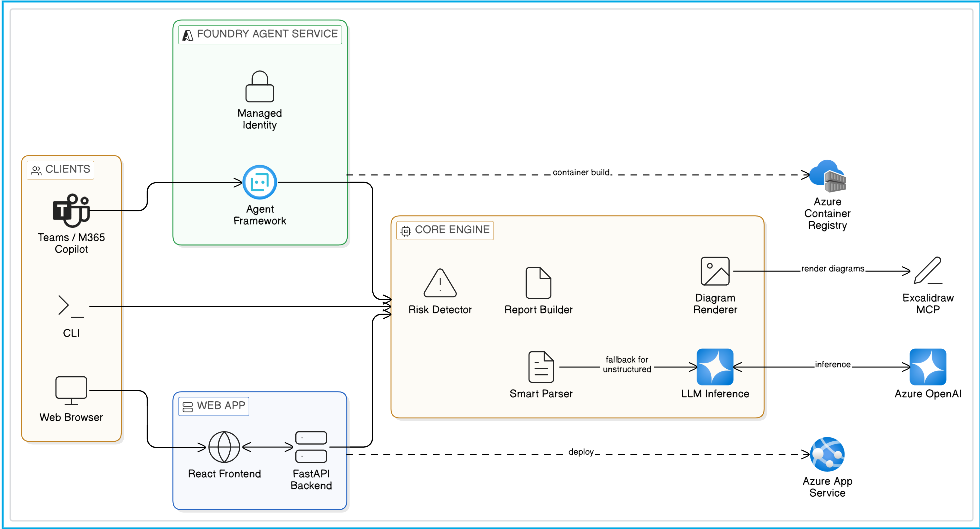
This diagram gives a quick system-level view of how the sample is positioned: multiple client experiences feed into either a Web App or Foundry Hosted Agent surface, both of which rely on the same shared review engine for parsing, analysis, report generation, and visual rendering.
NOTE The same review logic is reused across every surface. The delivery model changes, but the architecture understanding, risk analysis, and output generation flow stays consistent.
End-to-end product demo
If the video does not render inline in your browser, download and watch it here.
What the user sees end-to-end
| Stage | What happens | Why it matters |
|---|---|---|
| Input | User pastes or uploads YAML, markdown, plaintext, or messy architecture notes | Reduces prep friction and supports real-world design material |
| Understanding | Parser extracts structure or LLM inference fills the gaps | Makes the workflow resilient to both clean and messy inputs |
| Review | Risk engine identifies SPOFs, bottlenecks, weak boundaries, and anti-patterns | Helps teams focus on the most important design issues first |
| Visual output | Excalidraw + PNG are generated from the same architecture model | Keeps results editable for collaboration and usable for documentation |
| Packaging | Review bundle is saved as structured output | Makes follow-up automation and sharing much easier |
IMPORTANT This workflow is designed to reduce manual review preparation, not replace human architectural judgment. The generated risks and recommendations are intended to accelerate review and focus attention on the issues that matter most.
Motive / Why I Built This
I built this because architecture review quality is often limited by documentation friction, not by lack of engineering ability.
That pain showed up repeatedly in the same form. Teams had enough information to describe their systems, but not in a clean, review-ready package. One service was described in YAML, another in a wiki page, another in notes from a design review, and the latest changes lived only in code or conversation. By the time someone manually stitched all of that together into a diagram and a review document, the architecture had already moved on.
The problem became even more obvious in microservice and cloud-native environments, where:
- system complexity grows faster than documentation quality,
- architecture decisions have long-term reliability and cost impact,
- hidden SPOFs and anti-patterns are easy to miss,
- and review quality varies too much depending on who happens to be available.
The goal behind this sample was to build a kind of technical co-pilot for architecture review: a system that accepts the formats engineers already use, automates the heavy lifting of architecture understanding, and gives teams a faster first-pass review without pretending to replace human judgment.
Evolution: StructureIQ → Official Azure Sample
This sample evolved from my earlier project:
The jump from StructureIQ to the Azure Samples version was more than a rebrand. It was a shift from a strong prototype into a sample that other engineers could realistically adopt, learn from, extend, and deploy.
The Azure Samples version significantly expanded the scope:
- from a mostly local architecture-analysis flow to three usable surfaces: CLI, Web App, and Hosted Agent,
- from a project-centric implementation to sample-grade onboarding and clearer deployment guidance,
- from “generate a diagram” to produce a complete review package with risks, recommendations, visuals, and structured JSON,
- and from a local-first tool to something that could cleanly support App Service deployment, Foundry deployment, RBAC, managed identity, and scalable operational usage.
That evolution matters because it changes the audience. StructureIQ proved the concept. The Azure Samples version shows how the concept can be delivered in a way that makes sense for developers, solution architects, internal platform teams, and teams experimenting with hosted agents in production-like environments.
What I Built
I implemented a complete architecture-review pipeline organized around a shared core engine in tools.py, then exposed that same logic through multiple delivery paths.
At the center of the sample is a workflow that does five jobs in sequence:
- Interpret the input whether it arrives as YAML, markdown, plaintext arrows, README content, or prose.
- Infer missing structure when the input is not formal enough for deterministic parsing.
- Analyze risks and architecture quality using both rule-based checks and model-assisted reasoning.
- Generate visuals as interactive Excalidraw output and a high-resolution PNG export.
- Package the result into a structured review report with summary, risks, recommendations, and component relationship data.
I deliberately exposed the same engine through three usage models so the project is useful to different kinds of teams:
- Local CLI via
run_local.pyfor fast experimentation and structured local reviews - REST API + Web UI via
api.pyandfrontend/for browser-based collaborative review - Hosted Agent via
main.py,Dockerfile, andagent.yamlfor Microsoft Foundry deployment
That shared-core approach means the sample is not three disconnected implementations. It is one review pipeline delivered through three different operating models.
Core Capabilities
- Input adaptability: the sample supports structured YAML, markdown sections, plaintext arrow chains such as
A -> B -> C, and free-form documentation. It works with what teams already have instead of forcing them into a brand-new authoring format. - Smart parsing with fallback: deterministic parsing is used first for speed and consistency; if the system cannot extract a usable model, it falls back to LLM-based inference to recover components, flows, and intent from messy input.
- Risk intelligence: the review engine looks for practical concerns such as single points of failure, poor redundancy, scalability bottlenecks, risky coupling, weak architecture boundaries, and other anti-patterns that are easy to miss during rushed design reviews.
- Visual artifacts: the output includes an editable
.excalidrawfile and a high-resolution.png, so the generated diagram can be used in both collaborative design sessions and static documentation. - Automation-ready bundle: the pipeline also returns a structured
review_bundle.json, which makes it easier to integrate with downstream tooling, portals, reporting workflows, or internal automation. - Deployment flexibility: teams can choose a Web App model on Azure App Service when they want a custom UI and custom REST endpoints, or a Hosted Agent model on Microsoft Foundry when they want managed deployment, managed identity, and an OpenAI Responses-compatible interface.
Internal Review Flow
At runtime, the sample follows a very deliberate pipeline so the output stays predictable and explainable.
Step 1 - Accept architecture input in whatever form it exists
The entry point is intentionally flexible. A user can paste structured YAML, upload markdown, provide plaintext service chains, or pass in general architectural prose. This matters because forcing a perfect schema at the start would defeat the whole purpose of reducing review friction.
Step 2 - Parse known structure first, then infer when needed
The smart_parse() flow tries rule-based parsing first because that path is fast, deterministic, and easier to validate. YAML and markdown inputs can often be converted directly into components and connections. When the parser cannot confidently recover enough structure, the pipeline falls back to infer_architecture_llm() so the model can infer the architecture from less formal content.
Step 3 - Normalize the system into a component-and-connection model
Once the input is understood, the pipeline converts it into a normalized internal representation: components, connection edges, roles, and supporting metadata. This is the key translation step that allows everything downstream-risk analysis, diagrams, component mapping, and recommendations-to work from the same model.
Step 4 - Run risk analysis and build the component map
After normalization, the engine analyzes the architecture for reliability, scalability, security, and anti-pattern issues. In parallel, it also builds a component map with fan-in and fan-out style relationship data so users can see dependency concentration and coupling patterns, not just raw boxes and arrows.
Step 5 - Generate visual and downloadable outputs
The system then renders an Excalidraw-friendly representation and exports a PNG using the same architectural model. The point is not just to make the results pretty; it is to make them reusable. Teams can edit the Excalidraw output in a design conversation, while the PNG is ready for slide decks, architecture boards, or documentation.
Step 6 - Return a review bundle that is actually actionable
The final step is packaging. Instead of returning scattered fragments, the sample produces a structured review bundle with an executive summary, grouped risks, recommendations, diagram metadata, and outputs that can be downloaded or integrated elsewhere.
This entire flow is what makes the sample useful for both clean architecture specs and the far more common case of “messy but real” engineering notes.
Scenario Walkthrough (What You See End-to-End)
Reference scenario:
The microservices_banking.yaml scenario is a strong showcase because it reflects the kind of system that tends to create review complexity in real organizations: multiple services, distinct data boundaries, event-driven behavior, and operational sensitivity around availability and transaction flow.
In a typical run, the user uploads or pastes the scenario, the pipeline extracts the component graph, analyzes the architecture for high-priority concerns, and generates a full review package. The output is not just “here is your diagram.” It is a combination of:
- an interactive architecture view,
- severity-grouped findings,
- dependency and component mapping,
- and concrete recommendations that can be discussed in an engineering review.
The generated artifacts usually include:
architecture.excalidrawarchitecture.pngreview_bundle.json
That makes the scenario useful in three different ways: as a demo for new users, as a validation fixture when changing the review logic, and as a realistic example of what good output should look like.
User Experience Across the Three Surfaces
Local CLI
The CLI path is the fastest way to validate the core review engine. It is ideal for local experimentation, testing structured inputs, and quickly generating artifacts without needing to stand up a UI. For teams that want to work from sample scenarios, markdown notes, or a YAML file, this is often the shortest path from input to useful output.
Web App: FastAPI + React + Excalidraw
The web experience adds collaboration and visibility. The FastAPI backend exposes endpoints like /api/review, /api/review/upload, /api/infer, and download endpoints for PNG and Excalidraw files. The React frontend adds drag-and-drop file upload, tabbed results, and an interactive diagram viewer. In practice, this is the best fit for teams that want a review workspace in the browser and need a custom API surface they can extend.
Hosted Agent on Microsoft Foundry
The hosted agent path changes the operating model. Instead of managing a custom web application, teams can deploy the review logic as a managed containerized hosted agent using Microsoft Foundry and the Agent Framework hosting adapter. That gives them an OpenAI Responses-compatible interface, managed identity, platform-managed scaling, conversation support, and the option to publish through channels such as Teams or Microsoft 365 Copilot. For teams exploring agent-native delivery, this is where the sample becomes especially interesting.
Screenshots & Demo
Architecture overview
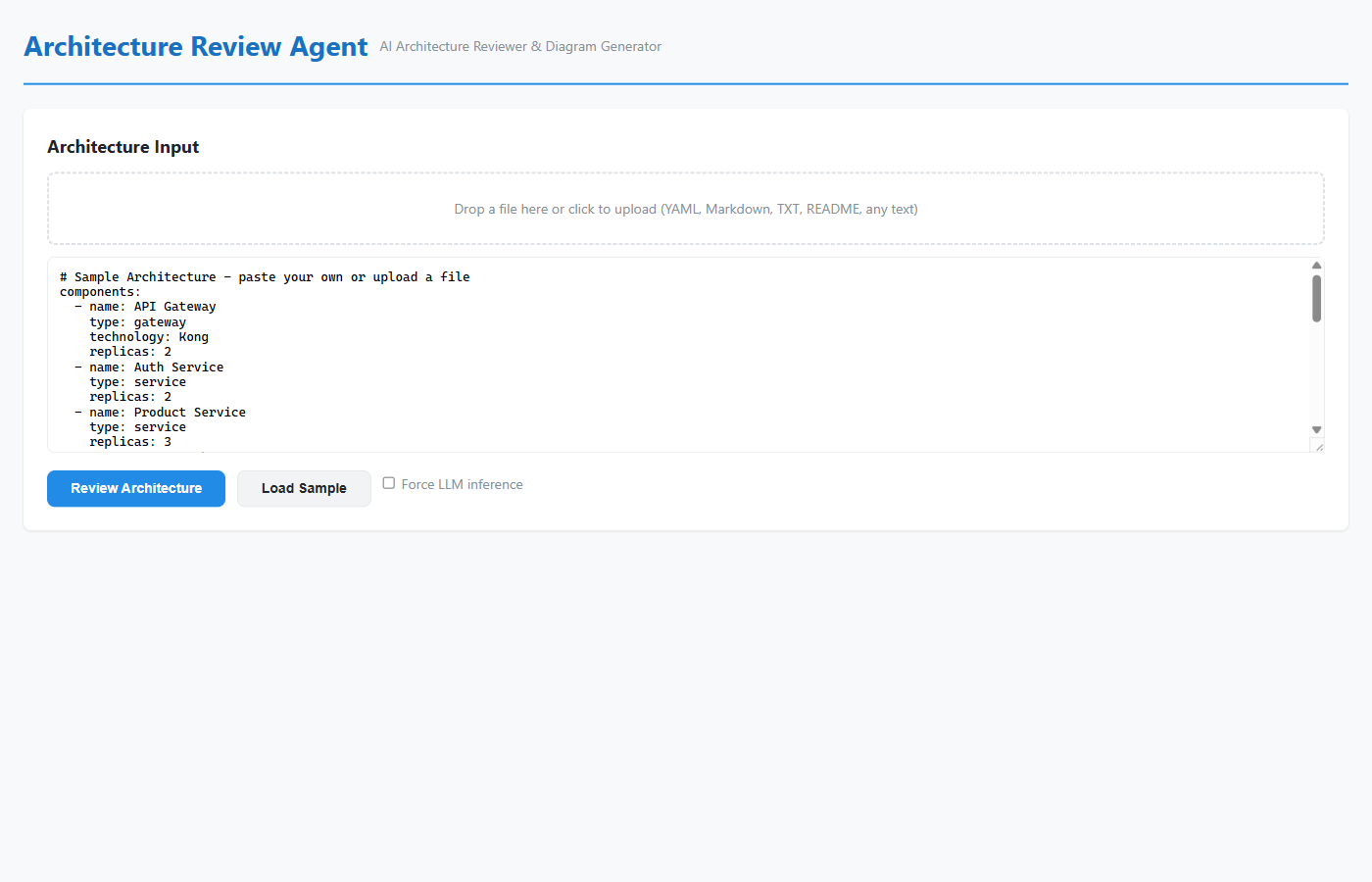
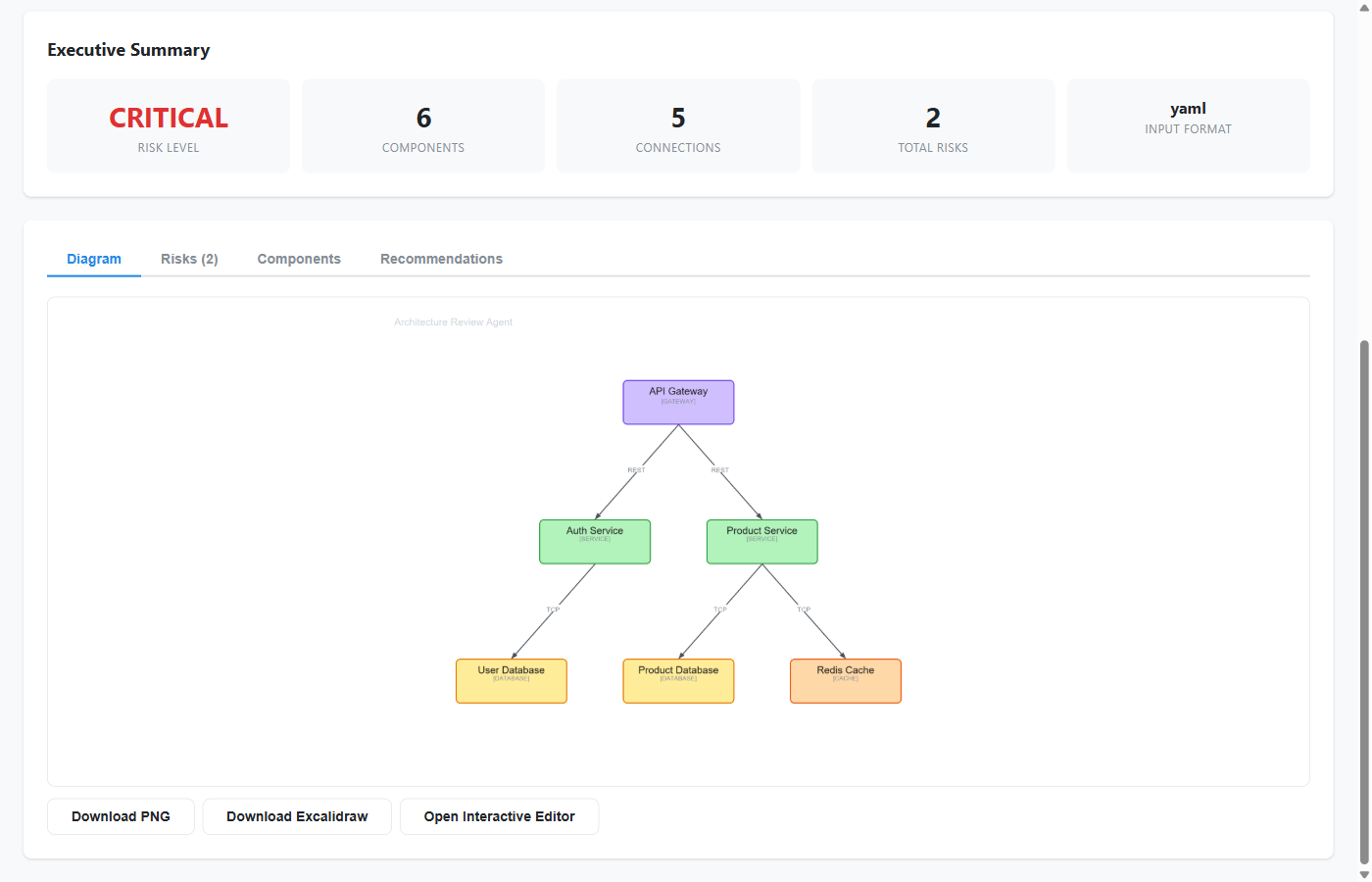
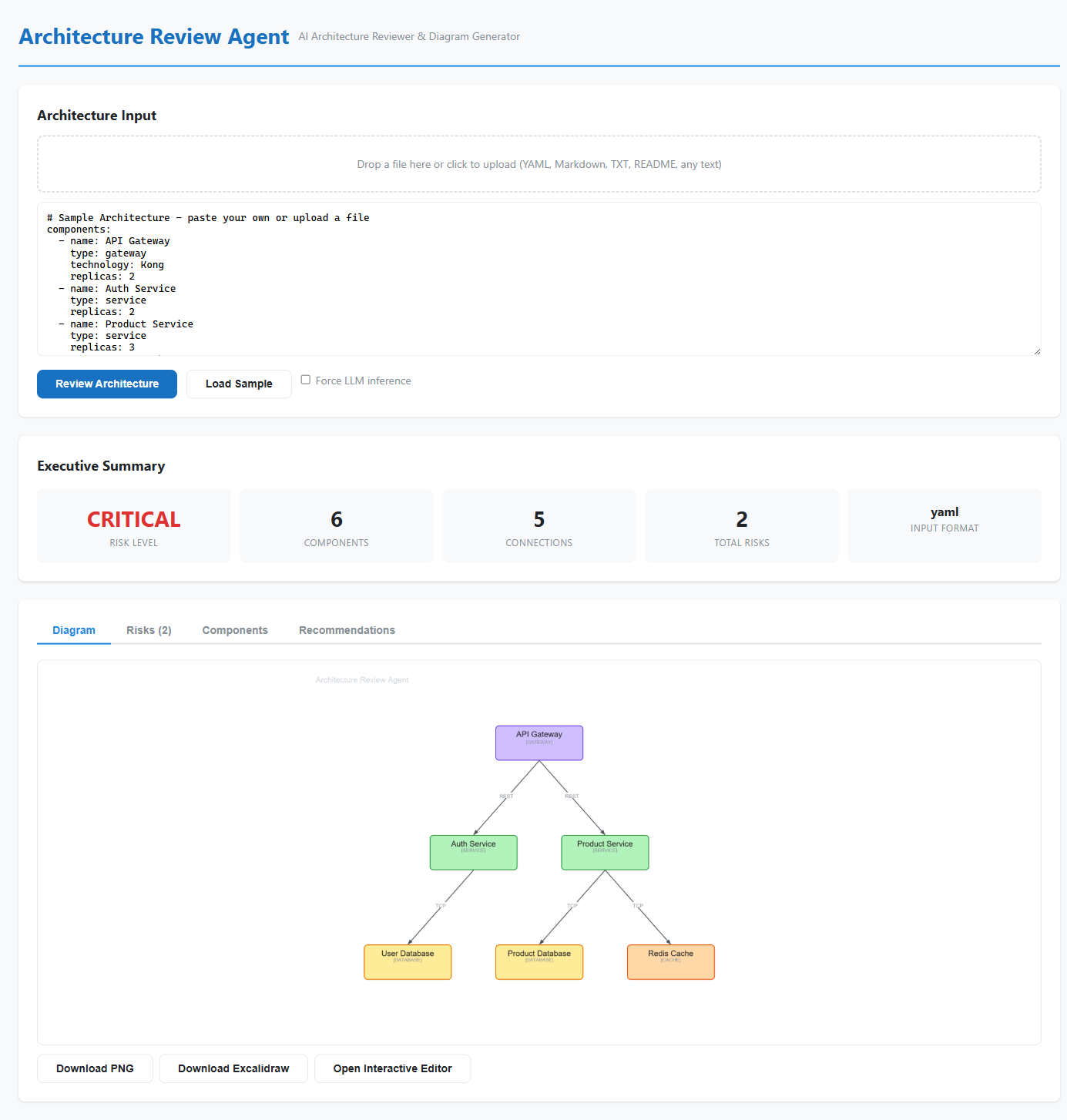
UI walkthrough screenshots
- Sample loaded view
- Review results + diagram
- Full page view
- Risks tab
- Components tab
- Recommendations tab
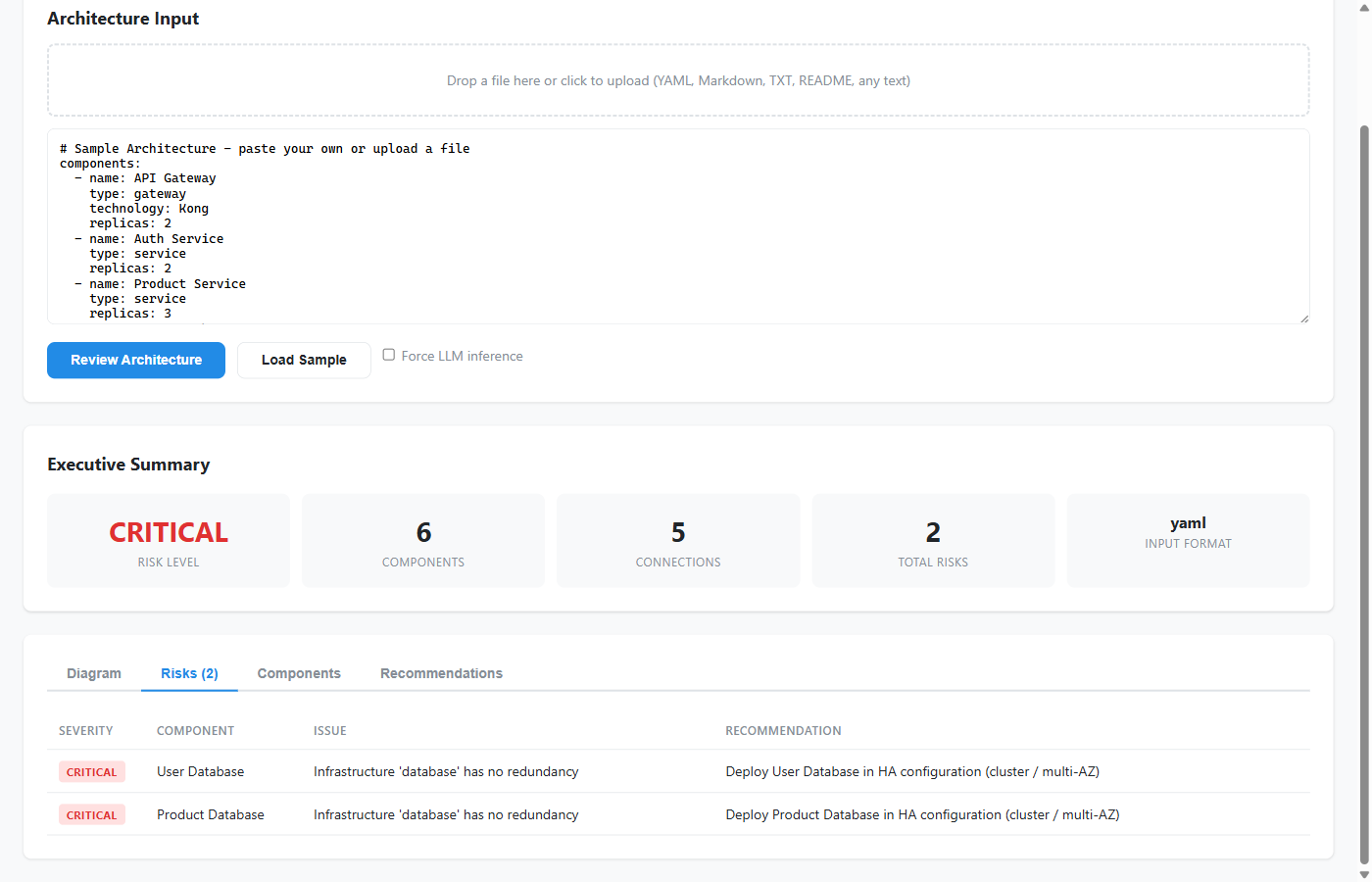
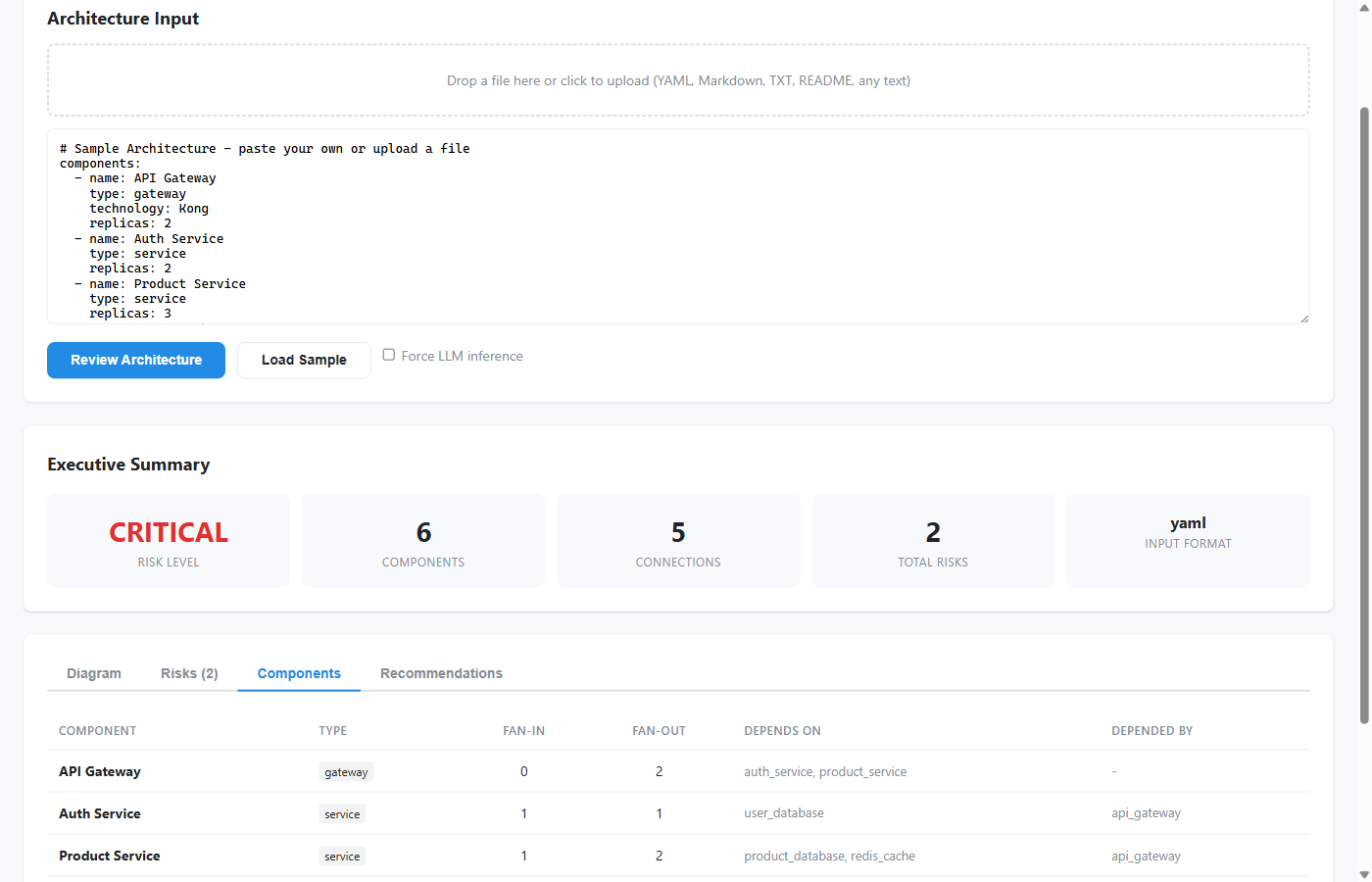
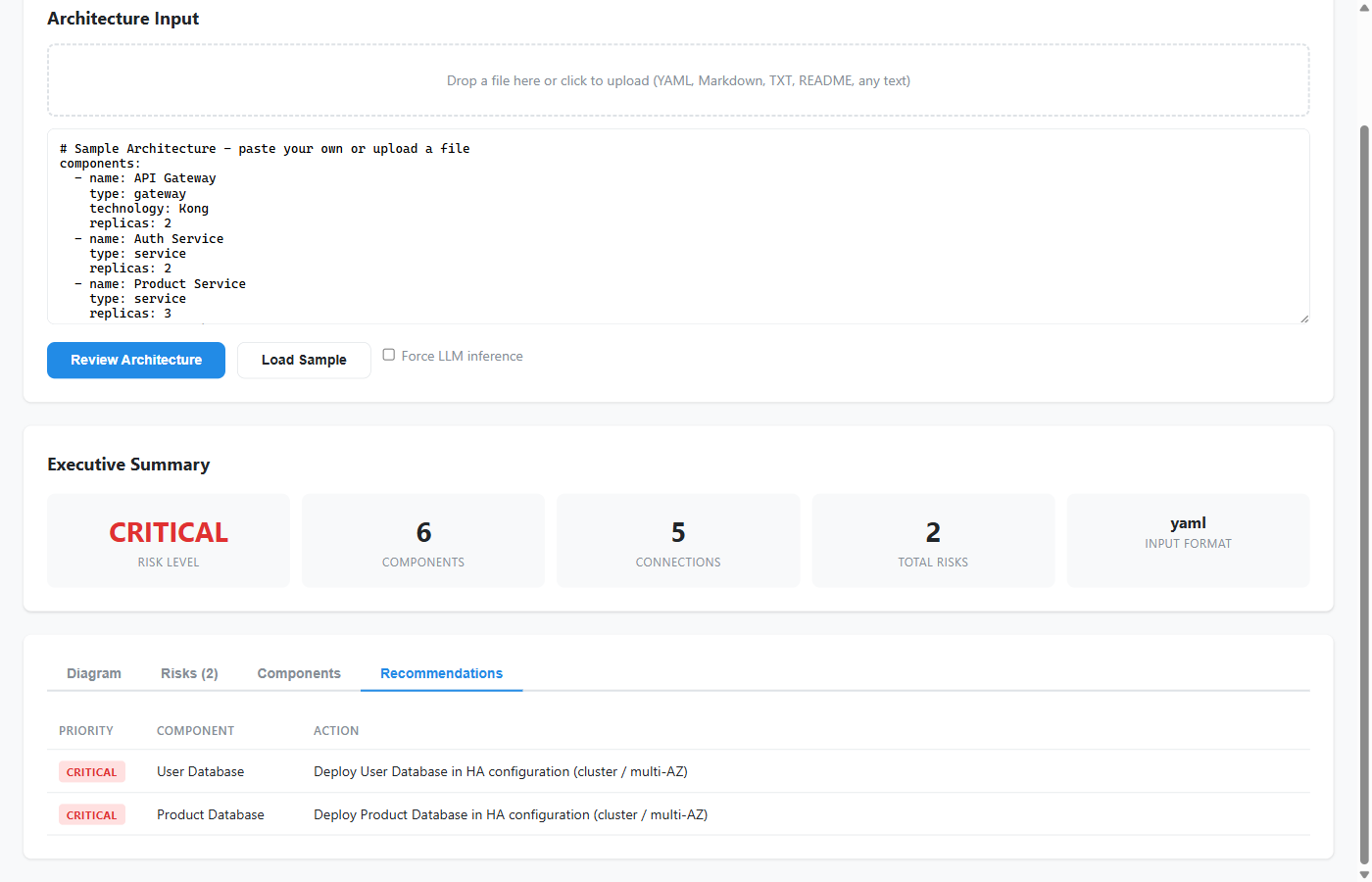
Demo video
These assets are intentionally included so users can quickly validate UI behavior and output quality without first deploying the full stack.
Deployment Paths
Option A - Web App (Azure App Service)
This path packages the FastAPI backend and React frontend into a more traditional full-stack application. It is best for teams that want full ownership of the API surface, browser experience, authentication model, and infrastructure decisions.
In this mode, the review flow is exposed through custom REST endpoints and the browser UI becomes the main operating surface. That makes it easier to plug the sample into internal portals, CI workflows, architecture dashboards, or engineering tooling where a stable custom API matters more than agent-native delivery.
Option B - Hosted Agent (Microsoft Foundry)
This path uses Microsoft Foundry Hosted Agents so the same review logic can run as a managed containerized service. The hosted agent model is especially useful when teams want fewer infrastructure responsibilities and more platform support around identity, scaling, observability, and channel publishing.
Based on the current Foundry workflow, the practical lifecycle is:
- wrap the agent with the hosting adapter,
- validate it locally on
localhost:8088, - package it in a Linux AMD64 container,
- deploy it through the VS Code Foundry extension or another supported path,
- and then test it from the playground or via the Responses-compatible endpoint.
That deployment story is one of the biggest reasons this project became stronger as an official sample: it shows not just how to build the architecture review logic, but how to operationalize it in a modern hosted-agent environment.
Detailed guide:
Technical Stack
- Microsoft Agent Framework for the hosted agent implementation and tool exposure
azure-ai-agentserver-agentframeworkas the hosting adapter layer for local testing and hosted deployment- Azure OpenAI / Foundry-compatible model access with GPT-4.1 highlighted in the sample guidance
- Excalidraw MCP for interactive diagram generation and editable visual output
- FastAPI for custom REST endpoints in the web app path
- React + Vite for the interactive browser UI
- PyYAML, Pillow, Rich and related Python libraries for parsing, export, and local developer experience
Engineering Decisions
- Dual-path understanding: structured parsing comes first because it is fast and predictable; LLM inference is used as a fallback so the system remains helpful even when the input is incomplete or informal.
- Risk analysis with practical value: the review engine is designed around concerns teams already care about in design reviews-SPOFs, weak redundancy, scaling pressure, coupling, and architecture anti-patterns-not around abstract novelty.
- Editable-first visuals: Excalidraw was a deliberate choice because generated diagrams should remain useful after generation. Teams need a starting point they can refine, not a frozen artifact they discard.
- Shared engine, multiple surfaces: keeping CLI, web, and hosted agent delivery paths on top of the same underlying pipeline reduces duplication and keeps behavior consistent.
- Operational optionality: supporting both App Service and Hosted Agents acknowledges that different teams optimize for different things-control, integration flexibility, managed operations, or channel publishing.
Challenges I Solved
- Input variability: one of the hardest parts was making the system useful across both clean and messy input. If it only worked with perfect YAML, it would be too narrow. If it only relied on inference, it would lose predictability. The final design had to balance both.
- Actionability gap: many architecture tools can parse or visualize, but fewer produce outputs that are immediately helpful in a review meeting. I focused on making the result usable: severity buckets, recommendations, exports, and component-level clarity.
- Visualization friction: diagram generation is only valuable if the diagram can stay part of the conversation. Producing both Excalidraw and PNG outputs helped bridge collaboration and documentation needs.
- Delivery complexity: supporting CLI, web app, and hosted agent modes without fragmenting the core logic required a shared architecture and clear file responsibilities across
tools.py,api.py,main.py, and the frontend.
Where This Helps Most
This sample is particularly useful when teams need to accelerate architecture understanding without sacrificing review quality. That includes:
- review preparation for engineering councils or architecture boards,
- modernization planning across microservice and event-driven systems,
- early risk surfacing before release or compliance gates,
- onboarding teams into unfamiliar systems faster,
- and improving communication across platform, application, and security stakeholders.
It is also a strong reference project for developers who want to learn how an Agent Framework-based application can move from local experimentation into a hosted, operational Azure/Foundry delivery model.
Why This Matters
Many sample repositories do a good job of showing isolated features. This one is valuable because it focuses on end-to-end outcomes.
It shows how to go from architecture input to architecture review, how to keep visuals editable, how to expose the logic through both REST and hosted-agent surfaces, and how to move from local validation to deployment in a way that still makes sense to real teams. That combination makes it stronger for demos, learning, internal prototypes, and enterprise conversations about how agentic systems can support architecture work.
Maintainer Note
I’m actively maintaining and improving:
- scenario quality and realism,
- architecture clarity and review depth,
- deployment reliability and documentation,
- and experience quality across CLI, Web, and Hosted Agent flows.
If you’re building hosted Foundry agents, this repo is intended to be a practical starting point.
Links
- Official sample repo: Azure-Samples/agent-architecture-review-sample
- Origin project: ShivamGoyal03/StructureIQ
- Announcement article: Stop Drawing Architecture Diagrams Manually - Microsoft Tech Community
- Project article page: Architecture Review Sample Article